
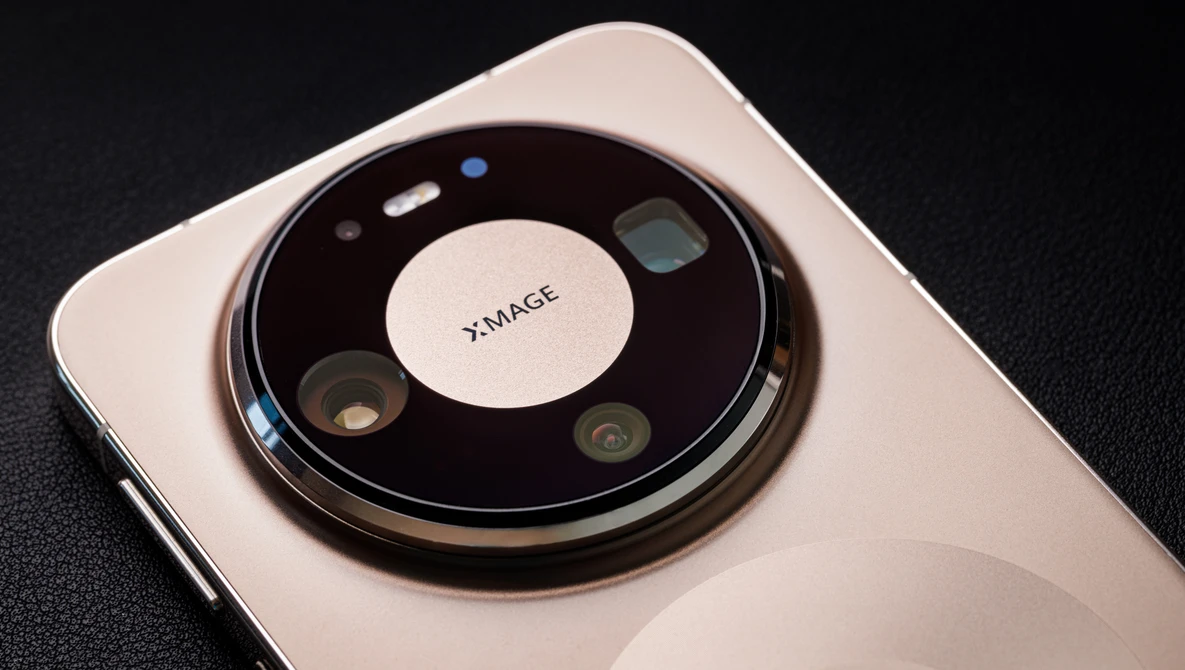
From the naming convention, the Mate series flagship smartphone has always been Huawei's way of showing off what they can really do, and it has been three years since Huawei launched the Mate series globally. This time around with the Huawei Mate 80 Pro, everything revolves around a rather bold slogan: "See It True."
This is to sell the idea of capturing a scene exactly as your eyes see it, using its latest industry-leading camera hardware to produce images that are natural, color accurate, and, most importantly, without all the usual digital artifacts we have come to expect from modern smartphone images. So in this review, we will be diving into the phone's camera system to see what it is actually capable of delivering. More specifically, how true is "See It True" when you start using it in the real world.
Build Quality

The Huawei Mate 80 Pro is the typical bar-shaped smartphone and on first impression feels pretty solid and premium—exactly how you would expect a flagship device would be. Huawei claims that in this model, they have further improved its durability while also innovating some parts of its physical design—specifically adding the second ring under the signature "Space Ring" camera module to give it a more distinctive look, which they call the Dual Space Ring design. However, the second ring is only there mostly for visual purposes as a rough indicator of where the wireless charging coil sits, as it does not introduce any new function like "MagSafe."

The Mate 80 Pro is a rather big phone, measuring 161.9 mm x 76 mm x 8 mm, and weighs around 219 g. Personally, I would prefer handling a smaller phone, and this is as big as I would be able to accept, considering the additional benefits such as a larger 5,750 mAh battery capacity with up to 100 W wired charging and 80 W wireless charging. For better durability, the Mate 80 Pro features an aluminum alloy frame, and the 6.75" OLED display on the front is protected by the 2nd Gen Kunlun Glass, which Huawei claims offers up to 20 times better drop resistance.

Around the back, Huawei is using an ultra-durable vegan fiber-reinforced plastic material instead of the usual glass finish, which also claims to improve the impact resistance up to five times. In terms of protection, the phone is rated IP68 and IP69. That means it is not only resistant to dust and up to 6 m of water submersion, but also capable of handling high-pressure and high-temperature water jets. In real-world use, this durability enhancement allows creators to actively use it with peace of mind even in rougher environments.
Key Features and Specifications
The Mate 80 Pro runs on EMUI 15 or HarmonyOS 6.0 for the China version, and it is paired with the 9-core Kirin 9030 Pro 6nm series chipset for the 16 GB RAM configuration, as you can expect from a flagship Huawei device. Although the 6nm chip feels dated and arguably less efficient compared to what's available on the market, the performance still does feel pretty stable and responsive. At least I have not experienced any lag on the device, which led me to believe there is still some headroom for daily use. In terms of graphics, it is handled by the Maleoon 935 GPU. The display features a 2832 × 1280 high-resolution panel with up to 3,000 nits peak brightness and a 1–120 Hz LTPO adaptive refresh rate.
Moving on to the key features of this article's focus—the camera. Huawei has packed some impressive new camera technology for the Mate 80 Pro that brings its imaging performance to the next level. The True-to-Color direction with their second-generation XMAGE system is now assisted by the new color sensor that features a 4x4 spectral sensing for even more precise color reproduction—up to 43% improvement, especially when dealing with complex scenes. This is evident when I started noticing subtle hues in the image that I missed when seeing with my naked eye.

Meanwhile, the main sensor has also been innovated to now feature a larger effective pixel size of 2.45 μm, effectively increasing its light intake by as much as 96% and dynamic range by 300%. On top of that, Huawei includes a suite of AI features like AI Composition, AI Remove, AI Retouch, and AI Best Expression to further improve the imaging experience. AI Composition here is a new one, which helps you find subjects in the frame and suggests a suitable crop for you. Note that it only works by cropping into your current frame, and for wider shots, you will have to rely on Master AI's recommendation.


https://youtube.com/shorts/F7NoUlkq_ZQ

The rear camera setup consists of three camera modules:
- A 50-megapixel 1/1.28" RYYB 24mm main camera with an f/1.4 to f/4 variable aperture
- A 48-megapixel RYYB 96mm equivalent periscope telephoto macro camera with f/2.1 aperture—one of the largest in the industry
- A 40-megapixel RYYB 13mm f/2.2 ultra-wide camera
Both the main and telephoto camera modules have phase detect autofocus (PDAF) and optical image stabilization (OIS), except the ultra-wide camera, which does not have any OIS. While the camera specification is already quite solid with the new ultra-lighting technology improving its light intake, secretly, I thought it was a missed opportunity for not making the main rear camera a 1" sensor for a better competitive edge. The front-facing camera features a 13-megapixel 18mm f/2 ultra-wide, and I have to say it is one of the best that I have used. It also features a ToF 3D depth and biometrics sensor, enhancing the phone's security.


The rear camera system is also designed to intelligently work with Huawei's pre-installed Master AI feature. Master AI automatically detects scenes and subjects in the frame, ranging from landscapes and food to pets, and optimizes settings such as color, contrast, and exposure accordingly. In many cases, it does help produce more visually pleasing results straight out of the camera, especially helpful for those who just want to do casual shooting and do not want to mess around with post-processing. However, it is worth being mindful of how it works. The enhancements once applied have no way to be fully reversible. A good rule of thumb is to leave it on in the photo mode and move to the Pro mode if your goal is to capture something that is more pure.
Video capabilities are decent on paper, supporting up to 4K at 30 and 60 fps for both 16:9 and 21:9 aspect ratios, alongside 1080p high frame rate options of 120 and 240 fps, even interpolated 960 fps for slow motion. However, with its gyro-EIS steady shot on, the resolution drops to 2.7K. It is worth pointing out that there is also no true 24 or 25 fps option, which does help to keep the menu system simplified.
Real-World User Experience
Starting with the general experience, using the Mate 80 Pro for photo and video shoots feels pleasant, fast, and responsive for the most part. Shutter response is rather quick, subject recognition works well, and autofocus is fast and quite reliable. Face detection is capable of detecting even when your human subject is relatively small in the frame, and immediately switches to eye detection when they are nearer, which makes the camera reliable and easy to use in spontaneous situations.

The high-brightness display also plays a role in the overall pleasant experience here. As you know, there is no viewfinder in a smartphone, and you will be solely relying on the display to compose an image. Here, the Mate 80 Pro's 3,000-nit display is bright enough to be used even under harsh backlight situations. And what's even better is that the phone itself does not heat up much during an extended shooting session at maximum brightness, which helps to maintain a stable overall experience. The only time I experience slight shutter lag is during an extended period of shooting in Pro mode set to save 50-megapixel files.

Battery life is fantastic, and I am honestly quite surprised that with all the processing on, it only drained for roughly 30% during a 3-hour shoot, yielding slightly below 300 images—including some long exposure shots. If there is a need, I can quite easily top up the battery using the wired 100 W fast charging and continue shooting in less than 15 minutes with 100% power. Practically, if you are actively shooting, I would say you will need to charge it once for 20-30 minutes mid-day, and you are good to go again for the second part of the day.

Let's move into the image quality and color, which is mainly the strength of the Mate 80 Pro's camera configuration. In practice, the 50-megapixel ultra-lighting main camera sensor with its larger 2.45 μm pixel size does show a noticeable improvement in light intake. This improvement becomes apparent in very low light situations, where it performs noticeably better than other phones with similar sensor sizes. The ISO performance has also been noticeably improved. Under dim lighting conditions, ISO 1000 is still very usable with some loss in finer details compared to the base ISO 50. ISO 1600 is where I would stop, as anything beyond that is just too soft.

Color reproduction is also quite consistent thanks to its improved 4x4 spectral sensing color sensor. In most cases, it is quite close to what your eyes see, and it even successfully picks up subtle hues that might otherwise go unnoticed. However, all this greatness highly depends on the spectral sensor getting a clean read; if you happen to be shooting through tinted glass or a foreground object that is partially obstructing the sensor, it can introduce some weird color cast into the scene. Auto HDR performance is decent as well, producing images with natural-looking tonality and good shadow and highlight retention. Exposure tweak is also rarely needed if you get the metering right. Combine that with Master AI, and you can effortlessly produce good images without the need for further post-processing. If you need a little bit more flair, you can utilize Huawei's XMAGE profiling for a more stylized look. And should you wish to stylize the shot manually in post, the JPEG files also have some latitude for it—roughly about 1.5 stops in either direction by my estimation, though do not hope to extract more details in those recovery areas as they are there just to balance the tonality. If you need more recovery capabilities, I do recommend shooting in raw.

Optically, you can expect them to perform at their best because they are built specifically for the device itself and should have been properly calibrated for optimum performance. Inspecting the images at 100% reveals that the main camera indeed does deliver good sharpness at f/2. There are hints of softening when stopped down to f/4, possibly due to diffraction.

Corners, however, are generally slightly weaker compared to the center. If you come from earlier-generation smartphones, both the ultra-wide and telephoto lenses will surprise you. To me, they do appear to be more consistent across the frame throughout the focal plane compared to the main camera. Flare resistance is generally well controlled on all three cameras, with the telephoto lens showing some flare.


Although the 96mm equivalent focal length can sometimes feel a little tight and can be a challenge to use, I do feel that the 4x telephoto lens implementation is genuinely quite useful. Mainly because it gives you better image quality through optical reach, as there is a limit to how far digital cropping can go before losing the interpolation benefits. That said, between 1x to 4x, the Mate 80 Pro achieves the 2x, 48mm equivalent zoom by relying on the stronger main sensor with variable aperture to interpolate for digital cropping, striking a good balance in the triple camera setup. The optical benefit of the 4x telephoto lens did not just stop there; it also allows you to focus as close as 5 cm, giving you the ability to take macro shots if needed. With the 96mm equivalent closely matching my Canon 100mm macro lens, I regularly find myself using it to quickly compose a shot before setting up the full-size camera.


Complementing the telephoto macro lens is the ultra-wide camera module, which also has the ability to focus quite close. When combined with the deeper depth of field from a smaller sensor, it gives you the option to create unique and creative shots with close-up foreground subjects. Though I have to say the telephoto lens is better at resolving close-up details, possibly because the wide angle lens isn't really optimized for close-up shots. One thing to note on the telephoto lens switching behavior is that if the telephoto lens is blocked when zooming to 4x, the phone will automatically use the main camera to digitally crop in instead. You are going to see the point of view shift between each other if there is a partial blockage. This behavior is also consistent in low light, where the system is smart enough to stick with the main sensor, presumably having a wider aperture and better low-light sensitivity.


This is where things get a bit more subjective. The cameras generally are capable of producing images with good detail and color, but the processing can sometimes be too strong for my personal taste. While this kind of processing might look acceptable on smaller output or in video when motion is involved, it becomes more noticeable when you start looking closer or using the images more seriously. A little noise here to me is completely fine to keep things organic. When the light level drops, sharpening and noise reduction can become quite aggressive, and there is currently no real way to fully control or dial this back unless you shoot in raw. To be fair, I am also putting out this judgment at a very high level of assessment; under some of these conditions, a proper camera might struggle to produce clean images too.

Things seem to vary between modes too. Normal mode appears to apply stronger noise reduction, while Pro mode leans more towards having stronger sharpening, probably assuming those in Pro mode are looking to get a sharper image. Personally, I would prefer to have a way to control the amount of processing and sharpening added to the image. But for now, I do recommend sticking with the normal mode for its simplicity and usability. Pro mode is really only useful when you need to push the exposure time or to shoot raw.
That said, there are also some minor usability quirks for rare use cases. The timer function is still buried in the menu, which can slow things down when you need it. Also, the ultra-wide camera placement at the bottom of the camera module isn't very ideal; there is a risk that your finger will be in the shot, especially when you shoot vertically, because that is where you rest your finger naturally. This is less of an issue in horizontal orientation.

Lastly, in the Pro mode, there is only one indication when all the ISO, aperture, and shutter speed settings are in manual, shown by the greyed-out EV setting. But there is also no clear indication when only one of the settings is manual unless you click in, and that can slow things down operationally. White balance and autofocus mode, on the other hand, when in automatic mode is indicated by the small white dot at the top right of the wording. Thankfully, the haptic feedback and tap-to-focus assistance for the manual focus part are nice to use.

Collection of images shot with the Huawei Mate 80 Pro.
Summary
What I Liked
- Low light capability - The larger pixel size and improved sensor do make a difference. In very dark scenes, the Huawei Mate 80 Pro is able to pull out more visible detail compared to other phones in a similar class.
- 4x telephoto zoom with strong macro performance - The telephoto lens that is capable of focusing as close as 5 cm is genuinely useful here.
- Good battery life with 100 W charging - Easily lasts through extended shooting sessions, and even if you run low, the fast charging makes it quick to get back up and running.
- Fast shutter response with reliable subject recognition - The camera feels responsive. Focus is quick, and subject detection—especially for faces and eyes—is dependable even at a distance.
- Accurate colors and tonality - Colors are generally natural and consistent, especially when the 4x4 spectral sensor has a clear read of the scene. Subtle hues are handled quite well.
- High screen brightness - Makes a real difference when shooting outdoors, especially under direct sunlight or backlit situations.
- Good flare resistance - The cameras handle flare well in most situations, keeping contrast intact.
- Strong overall durability - With the 2nd Gen Kunlun Glass, IP68/IP69 ratings, and the more impact-resistant vegan fiber back, it feels like a device you can actually use in tougher shooting conditions without worrying too much.
What Could Be Improved
- Control over AI processing - Including a way to control the amount of sharpening and noise reduction without shooting raw would be great.
- Adding 24/25 fps video options in the Pro video mode - Great for those who are more particular about video workflows.
- Indication of auto/manual exposure settings in Pro mode - Adding clear indicators showing which parameters are set to auto and manual can be useful.
- Timer accessibility - A shortcut or quicker timer access would improve usability.
- Ultra-wide camera placement - Moving the position higher to avoid accidental finger intrusion when shooting vertically.
Final Thoughts
To conclude, I do enjoy the experience of shooting with a mobile phone like the Huawei Mate 80 Pro. It is simply less intimidating to the people around me. Because smartphones are everywhere now, most of the time, people either do not notice or just glance at me and move on. That alone makes it a very practical tool for more candid or natural moments.
That said, there is a lot to like here—especially in terms of hardware and overall flexibility. The camera system of the Mate 80 Pro is capable, and in many situations, it does deliver results that are genuinely impressive. I think what holds it back from being taken more seriously is still the level of AI processing that is baked into the system. And beyond that, we still have to deal with the reality of what this is. At the end of the day, it is still a smartphone camera system with a stigma that the camera is only as powerful and useful as its battery lifespan and software support.
No comments yet