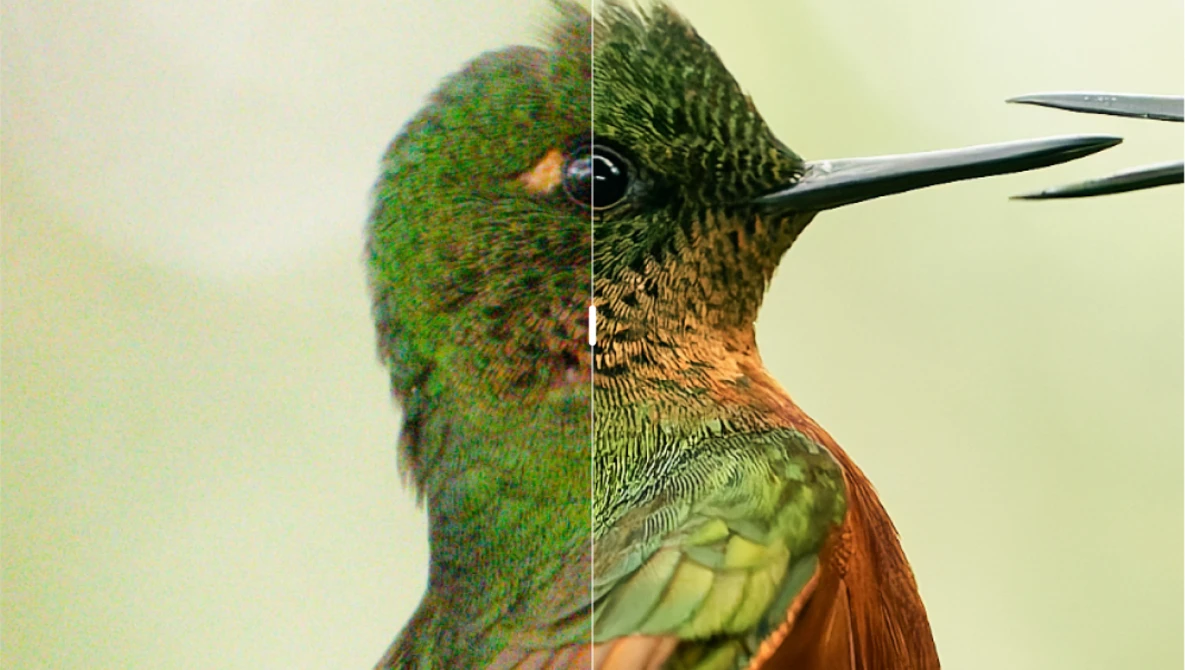
DxO PureRAW has been a go-to item in the workflow of photographers for years. PureRAW launched back in 2021, designed as a tool to preprocess Raw files before they go into an editor. The software de-noises your image, then corrects for defects in your optical path or the sensor. To do this, DxO maintains an extensive database of lenses and sensors so it can match your equipment to the corrections.
What's New?
This latest version of PureRAW, version 6, has some extensive improvements that seem to me to be a bigger leap than some of the previous versions.
First, version 6 extends DeepPRIME XD3 — previously exclusive to X-Trans sensors — to deliver its extensive noise reduction and detail extraction for both Bayer and X-Trans cameras. This latest version also brings a host of intelligent improvements: game-changing new DNG compression that delivers Raw quality at a fraction of the file size; AI sensor dust removal that cleans entire batches of images; and powerful workflow improvements.
According to Jean-Marc Alexia, VP of Product Strategy at DxO:
With this release, we've made extraordinary image quality more accessible than ever. DeepPRIME XD3 extends the power of our neural network to every camera type, while workflow improvements give photographers a faster, smarter, and more enjoyable experience from start to finish. It's the essential first step of every raw workflow.
One of the most interesting changes in this latest PureRAW software is DNG compression that leaves you with smaller files.
DxO claims this new High-Fidelity Compression delivers Raw-quality output in DNG files up to four times smaller than standard uncompressed versions. This breakthrough means that photographers no longer need to compromise between quality and storage. DxO's intelligent compression technology maintains the full dynamic range and flexibility of a Raw workflow while dramatically reducing disk usage. Large-scale processing and archiving become faster, lighter, and more efficient than ever.
AI Sensor Dust Removal
This one was a surprise, but a welcome one. The company claims this is the most advanced and accurate automatic dust-spot correction available. By harnessing the power of AI, DxO PureRAW 6 intelligently identifies and removes sensor dust marks across entire batches of images.
Users can fine-tune the cleaning threshold for total control, while automation eliminates the need for tedious manual retouching. The result is a spotless workflow that saves time and preserves image integrity, even when processing thousands of photos at once.
Faster Processing: Batch Parallelization

DxO PureRAW 6 accelerates high-volume processing with new batch parallelization, intelligently preparing the next image before the previous one is finished. The result is dramatically faster throughput and smoother handling of large sets of files.
Giving PureRAW 6 a Try
I was sent a near-release-quality beta to try, and it was a great experience. You drag any Raw image onto the app, or it can batch process multiple images.
I gave PureRAW a Hasselblad X2D II 100C image with their new Hasselblad XCD 35-100mm f/2.8-4 E lens, which was immediately identified.

I did a 300 percent zoom to see if PureRAW was increasing detail and sharpness, and it was readily obvious in the cactus near the top of the photo. Compare the cactus on the right, which passed through PureRAW, and the one on the left, which was straight out of camera.

I also tried a drone image from a DJI Mavic 4 Pro. PureRAW identified the camera right away and fixed some minor distortion in the wide angle lens, and sharpened the image as well. The sharpening is easy to see if you compare the distant roof tiles. The sharpened version is on the right; the original image is on the left.

Again, I'm zooming to 300% to see the details.
Sensor dust removal worked well. Adobe, Skylum, and others have similar technologies to clean up dust. In a couple of trials, PureRAW 6 edged out the competition.
The results of using DxO PureRAW are not subtle, and I think photographers wanting the best from their cameras and optics should think seriously about using this unique software. DxO offers a free trial so you can see if it makes a difference for you.
What I Liked
- It just works without fiddling around
- PureRAW provides a Lightroom plug-in
- AI dust removal is an added plus
- New support for X-Trans sensors for XD3 processing
- Raw files are compressed without quality loss, saving disk space
- Batch processing is noticeably faster
What Could Be Better
I'm at a loss here. I'm sure there will be improvements in the software capabilities in future iterations, but it's really excellent in this release. It was stable, and improved every Raw file I fed it.
How toGet PureRAW 6
It's available as a download today from DXO. Pricing has not changed from the last several versions:
- New license: $139.99 / €129.99 / £119.99
- Upgrades from DxO PureRAW 4 or 5: $89.99 / €79.99 / £74.99
You can get a 14 day free trial here.
8 Comments
When will these improvements come to PhotoLab, and will this be a free update to v9 or require a paid upgrade to v10 later in the year?
I was curious about this too. The documentation is frustratingly contradictory, but it does seem that PhotoLab 9 Elite will get DeepPRIME XD3. (Not the Essential Edition, which has never had DeepPRIME.)
The FAQ at the end of the PureRAW 6 product page states: "Both applications feature the same groundbreaking denoising/demosaicing technology. If you own DxO PhotoLab 9, you have everything that’s inside DxO PureRAW 6".
Which isn't entirely true given there's no update yet for PhotoLab. But it's also not true on the sense of "everything", as according to another FAQ, PhotoLab won't be getting the batch conversion and renaming functionality.
See:
https://www.dxo.com/dxo-pureraw/
https://support.dxo.com/hc/en-us/articles/4425780764561-Do-I-need-DxO-P…
Damn, I really want the compressed DNG feature so I don't have to do DNG conversions in Lightroom. Faster DeepPRIME processing would be welcome, too. I don't care if it's a paid upgrade to PhotoLab 10, I just want it to be available soon.
FYI, PhotoLab 9.6 just got released with support for DeepPRIME XD3 and DNG Compression. Although they changed the DNG export options - not sure if that's relevant to what you were wanting. Haven't tried it yet myself.
Release notes for Windows: https://download-center.dxo.com/Support/docs/PhotoLab_v9/release-notes/…
Release notes for OSX: https://download-center.dxo.com/Support/docs/PhotoLab_v9/release-notes/…
And the FAQ about DNG export options that it mentions: https://support.dxo.com/hc/en-us/articles/34450035269277-Why-does-DxO-P…
Oh no...PL9.6 no longer offers the option to export to DNG with all adjustments applied. This completely nullifies for me the benefit of exporting compressed DNG. For my workflow, it's actually a step backward. Ugh.
The answer is, no. You can’t upgrade no matter how recently you bought version five. I literally bought version five a couple of weeks ago (when the company apparently offered a deal to all of the YouTube influencers) and was told the other day that I need to pay the entire $89 to upgrade to version six.
This smacks of the same shortsighted corporate philosophy that Skylum has with Luminar. I am a leader of one of the largest photography clubs in the country and give presentations to other clubs. I used to recommend Luminar but stopped because of what I felt was corporate greed.
While I think highly of DxO Pure Raw, I told the company that I am going to start offering the same caveat emptor when I talk about buying DxO. Frankly, if a company releases a new version within a short time of purchase, there should be some free or significantly discounted offer to upgrade.
"The answer is, no. You can’t upgrade no matter how recently you bought version five."
Did somebody ask about this? I asked about PhotoLab.
Well I bought the v5 license not so long ago, when it was released and I already have to pay 80 bucks, again and again and again. Tired of it in a way. Why not stick to an already very good version for couple of years?